InspectorPro


InspectorPro 10
Designed and built by
With additional contributions from


InspectorPro 10 Is Here: AI-Ready, Built for FileMaker 26, on All Platforms
Using InspectorPro, FileMaker developers can analyze their solutions to gain insight into performance. The tool can detect problems and warnings, identify references and dependencies for any element, compare differences between solutions, and review security privileges.
Previous updates have allowed InspectorPro to integrate with Slack for real-time alerts about schema changes, and GitHub for version tracking and change attribution. With version 10, all that analysis is now connected to AI as well, using the InspectorPro-MCP.
What's New in Version 10
AI Connection via included MCP: A new Script Insight tool lets you connect your analysis to Claude, ChatGPT, Gemini, and other models through MCP to ask questions about schema items.
Cross-platform availability: Version 10 is compatible with Mac, Linux, and Windows, meaning mixed-platform teams can run the same analysis from their respective machines.
FileMaker 26 Ready: InspectorPro now reads FileMaker 26's smaller UTF-8 XML report, with support for all the new functions and script steps. Users on FileMaker 22 can use the new version as well.
GitHub-inspired FileMaker Heatmap: A visual record of daily activity across a 26-week period, broken out by users and work type.
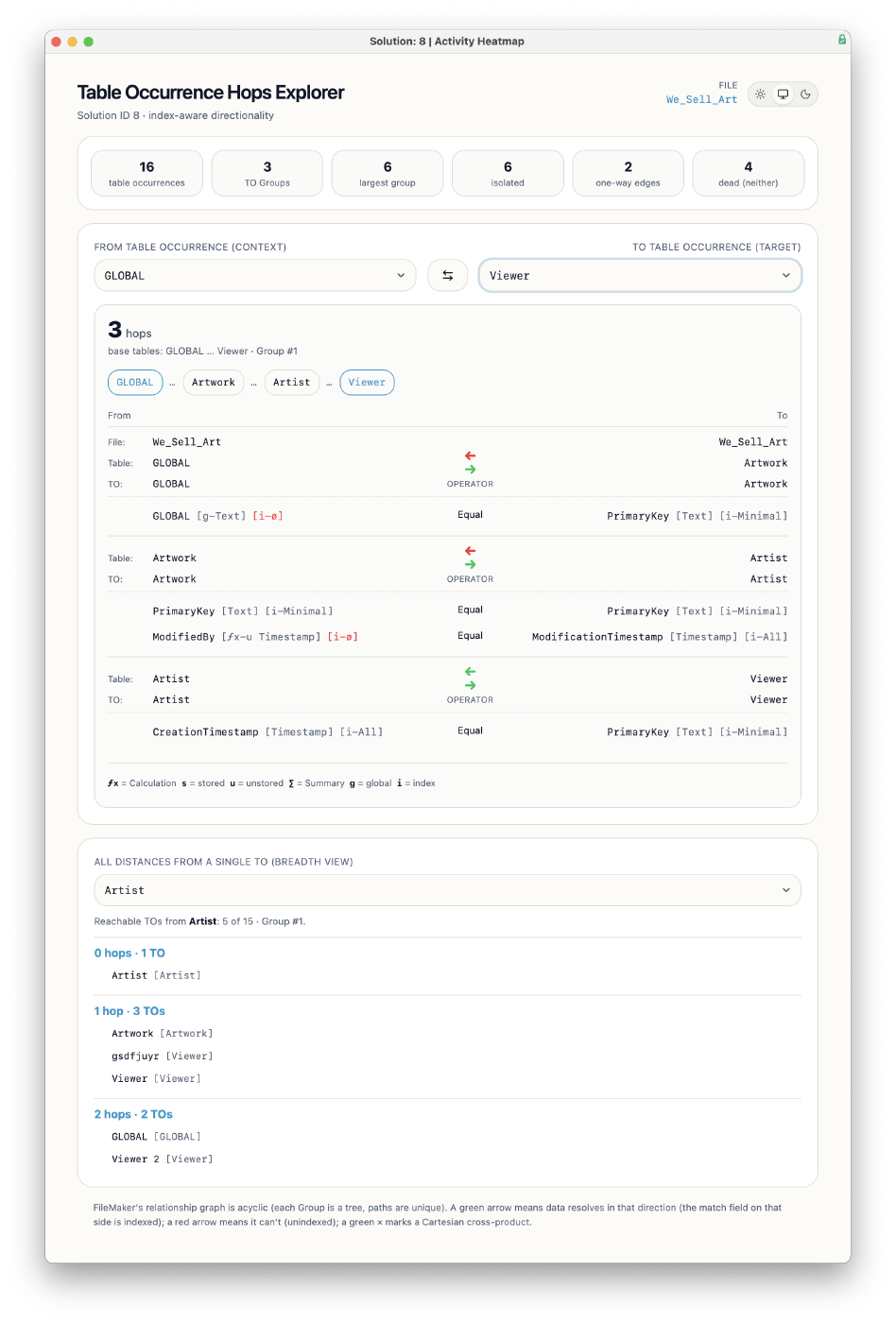
Table Occurrence Hops Explorer: Gain insight into the connections between various Table Occurrences in your solution, including data flow directionality.
Added views: Browse and copy persistent data store items, and see which fields carry annotations and display-name calculations.
Faster navigation: Custom menus and keyboard shortcuts across the dashboard and visualizations.
Greater flexibility: Add or remove files after your first analysis, plus two Git integration improvements.
The Power of FileMaker XML
InspectorPro takes advantage of the "Save a Copy as XML" feature to collect, analyze and report on a more complete set of metadata. Version 10 can process both the smaller XML output of FileMaker 26 and the previous XML of FileMaker 22.
InspectorPro Consultation
InspectorPro builds better collaboration, performance and insight for FileMaker teams. We can help you learn from InspectorPro’s insights to see how best to make improvements.
A consultation will help you maximize InspectorPro's capabilities and make the most of its reports. Learn More
Video User Guide & Introduction
Chief Innovation Officer at Beezwax, Vince Menanno, walks you through this in-depth tutorial on using InspectorPro! In this video, you will learn the essential steps to start with InspectorPro, from setting up your account to leveraging powerful features for analyzing and managing your FileMaker solutions.
You can also review our detailed ReadMe guide.
FileMaker Activity Heatmap
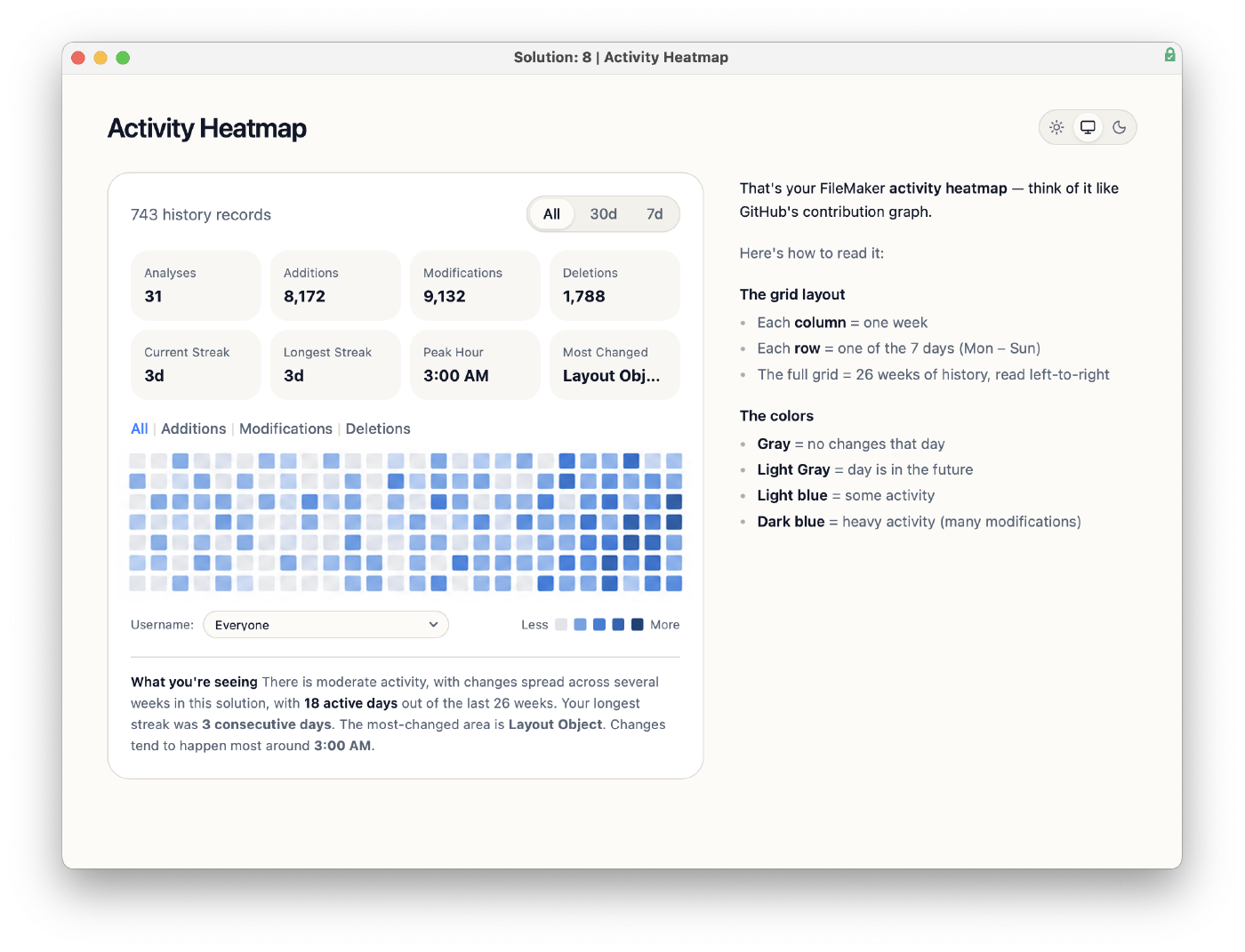
Table Occurrence Hops Explorer
GitHub Integration
FileMaker schema, meet version control.
InspectorPro now syncs directly with GitHub and GitLab, allowing you to track, commit, and collaborate on FileMaker changes with developer-grade tools.
- Automatically pushes analysis results to GitHub.
- Creates and manages repos, branches, and commits for each analysis.
- Tracks baseline and incremental changes per file.
- Links users for accurate commit attribution.

Notifications via Slack
Custom alerts. Zero guesswork.
- Alerts for new fields, modified scripts, changed layouts, and more.
- Set notifications for changes made by specific users or groups.
- Monitor production environments passively—catch changes before they cause issues.
- Notifications are sent when analysis is completed or when a scheduled script runs.

AI-Powered Script Summaries
Your FileMaker scripts—decoded by AI.
InspectorPro uses built-in AI to analyze and summarize your FileMaker scripts in plain English. No more hunting through lines of logic to figure out what a script does.
- Uses AI to read your script steps and generate a summary
- Translates logic into plain-language descriptions
- Adds searchable summaries to every script
- Saves hours of dev time during onboarding, debugging, and code reviews

InspectorPro Fields

InspectorPro Layout Objects & Styles

InspectorPro Security

As FileMaker evolves, so does the need for smarter, faster developer tools. Below is a breakdown of key InspectorPro features aligned with the version of FileMaker you use.
| Feature | Up to 2023 (v20) | FileMaker 2024 | FileMaker 2025 | FileMaker 2026 |
|---|---|---|---|---|
| InspectorPro Compatible Version |
v7
|
v8
|
v9, v10
|
v10 |
| Work Uninterrupted During Analysis | ||||
| Add-On Integration | ||||
|
INVESTIGATE
|
||||
| Attach Notes or Tags to Any Item | ||||
| Unlimited number of Solutions | ||||
| Unlimited number of Analyses | ||||
| Extra Areas of Information | ||||
| History and History Items | ||||
| Baseline Analysis | ||||
| Local Processing | ||||
| Upload to Server for Processing | ||||
| Graphical Summary Dashboard | ||||
| Connect to AI via MCP | ||||
| FileMaker Heatmap | ||||
| Table Occurrence Hops Explorer | ||||
|
ACCELERATE
|
||||
| Process Entirely On Server | ||||
| InspectorPro Integration API | ||||
| Improved use of 64-bit and multi-threading | ||||
| XML 1.0 (DDR) | ||||
| XML 2.0 (Save a Copy as XML) | ||||
| Progressive Updating | ||||
| Reads UTF-8 XML output | ||||
|
COLLABORATE
|
||||
| GitHub/GitLab Integration | ||||
| Github - Change History | ||||
| Github - Change Attribution (Blame) | ||||
| Slack Integration | ||||
| Slack - Notify users via Slack ID | ||||
| Multi User Support | ||||
| Solution Restriction to Members | ||||
| Timezone Support | ||||
| Adding Watched Items |
Features
- Review your solution's security privileges in depth.
- Security "cross tab" information at your fingertips.
- View privilege sets across base tables, fields, layouts, scripts, or value lists
- Calculation Problems
- Script Problems
- Layout Object Problems
- A solution is added, or deleted from InspectorPro
- An analysis begins or completes processing
- A note is added by a development team member
- Intuitive dashboard captures all the information you need
- Filter down to focus areas with easy toggling
- Navigate the tool as you would a browser
- Compare changes between versions of your FileMaker solution.
- InspectorPro reports on changes, and highlights relevant items or code.
- Drill in to view change details, or run a report sorting by change type or area.
- Continually view and navigate to detailed references in a tear-away window
- Easily identify disabled or dormant references
- Quickly determine all reference locations
- Global search across fields, layout objects, calculations and more
- LOgiCATOR UI makes Item search intuitive and consistent
- Search results are neatly organized for review
Track your progress while reducing problem code, and getting rid of technical debt. InspectorPro’s Progress Dashboard shows you analysis graphs that summarize:
Create a Slack channel for each solution, or simply one channel for all development. Notes added to InspectorPro can appear in the designated Slack channel.
Trigger update notifications in Slack when:
Users can save their searches and call them up whenever needed.
Build a custom Script Monitor and integrate it with your solution. You can monitor some or all of your scripts in any of your solutions, with visual signals or even auditory notifications when some part of your solution performs a critical action.
Use the Script Insight tool to connect your analysis to Claude, ChatGPT, Gemini, and other models through MCP.
InspectorPro's help has direct links to FileMaker help for script steps, script triggers and functions.
What and where is this item referenced? As a developer, you want to know all the places where a particular item is referenced easily.
Global Search and Item Search
Developer Spotlight
Vincenzo Menanno
Chief Innovation Officer
Vince is a true pioneer amongst Claris FileMaker developers and is internationally recognized as an expert technical consultant. As Chief Innovation Officer at Beezwax, Vince leads Research and Development on cutting-edge methods and tools for Claris Platform development.
Brendan Pierce
Sr. Developer
Brendan is a FileMaker and Web developer, collaborating with other Beezwax team members on custom software solutions, with an emphasis on globally-based clients and users.